Lenovo Legion Go Buying Guide: Features That Set It Apart
What makes the Lenovo Legion Go different from other Windows gaming handhelds, and how to decide if its design fits how you play.
What makes the Lenovo Legion Go different from other Windows gaming handhelds, and how to decide if its design fits how you play.
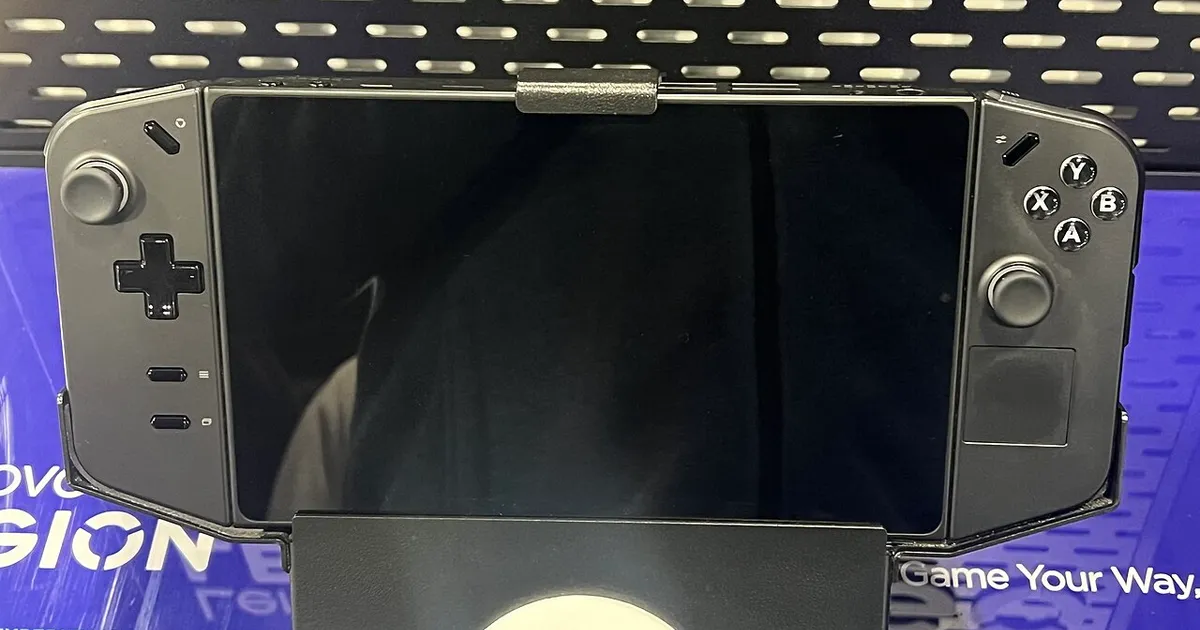
Photo by TaurusEmerald / Wikimedia Commons / CC BY-SA 4.0
Lenovo’s Legion Go stands out in the crowded Windows handheld category through a few distinct design choices rather than raw specs alone. Understanding those choices helps clarify whether it’s a better fit for you than more conventional handhelds.
Detachable Controllers and Kickstand Design
The most distinctive feature of Legion Go is its detachable side controllers, similar in concept to how Nintendo Switch’s Joy-Cons work, paired with a built-in kickstand on the main unit. This lets you prop the screen up and use the controllers separately — useful for tabletop-style local multiplayer, or simply resting your hands in a more relaxed position during long sessions rather than holding the full device up the whole time. It’s a meaningfully different ergonomic approach than a fixed, single-piece handheld body, and whether that’s an advantage depends on how you actually like to hold and play games.
Display and Size Trade-offs
Legion Go generally sits toward the larger end of the Windows handheld category, with a bigger screen than many competitors. A larger display can make text and UI elements easier to read and can be genuinely nicer for visually detailed games, but it also means a larger, heavier device to hold for extended sessions, and a bigger battery draw to power that screen. If portability and one-handed comfort matter more to you than screen real estate, weigh this trade-off carefully against more compact alternatives before buying.
Performance Expectations for a Windows Handheld
Like other Windows-based handhelds, Legion Go runs full Windows and offers adjustable performance modes that trade power draw for graphical output. Actual performance in any given game depends heavily on that game’s own requirements and how well it’s optimized for handheld play, so it’s worth checking real-world impressions for specific games you care about rather than assuming uniform performance across your whole library. As with any Windows handheld, expect some initial setup time getting background processes and power settings tuned before the experience feels smooth.
Is It the Right Handheld for You
Legion Go tends to suit players who:
- Want the flexibility of detachable controllers for tabletop or shared-screen play.
- Prioritize a larger display and don’t mind a bigger, heavier device in exchange.
- Are comfortable with the general quirks of a Windows-based handheld, since it shares the same platform trade-offs as other Windows handhelds on the market.
It’s a less natural fit if you specifically want the smallest, lightest possible device, or if you’d rather avoid Windows-specific setup and maintenance entirely in favor of a more locked-down, console-like interface.
Bottom Line
Legion Go’s detachable controllers and larger screen are genuine differentiators, not just marketing points — they change how the device can physically be used compared to a fixed-body handheld. Decide based on whether that flexibility and screen size are worth the added size and weight for your specific play habits.
Our picks: Legion Go
Shop on Amazon
Affiliate links.As an Amazon Associate I earn from qualifying purchases. Links below go to Amazon; prices and availability change, so check Amazon for current pricing.Affiliate disclosure

Illustrative photos: Photo by TaurusEmerald / Wikimedia Commons / CC BY-SA 4.0; Photo by Wide Awake! / Wikimedia Commons / CC BY 4.0; Photo by Evan-Amos / Wikimedia Commons / Public domain