Joy-Con Drift and Other Common Nintendo Switch Problems, Explained
What causes Joy-Con stick drift, how to try fixing it yourself, and other common Nintendo Switch issues worth knowing about before they get worse.
What causes Joy-Con stick drift, how to try fixing it yourself, and other common Nintendo Switch issues worth knowing about before they get worse.
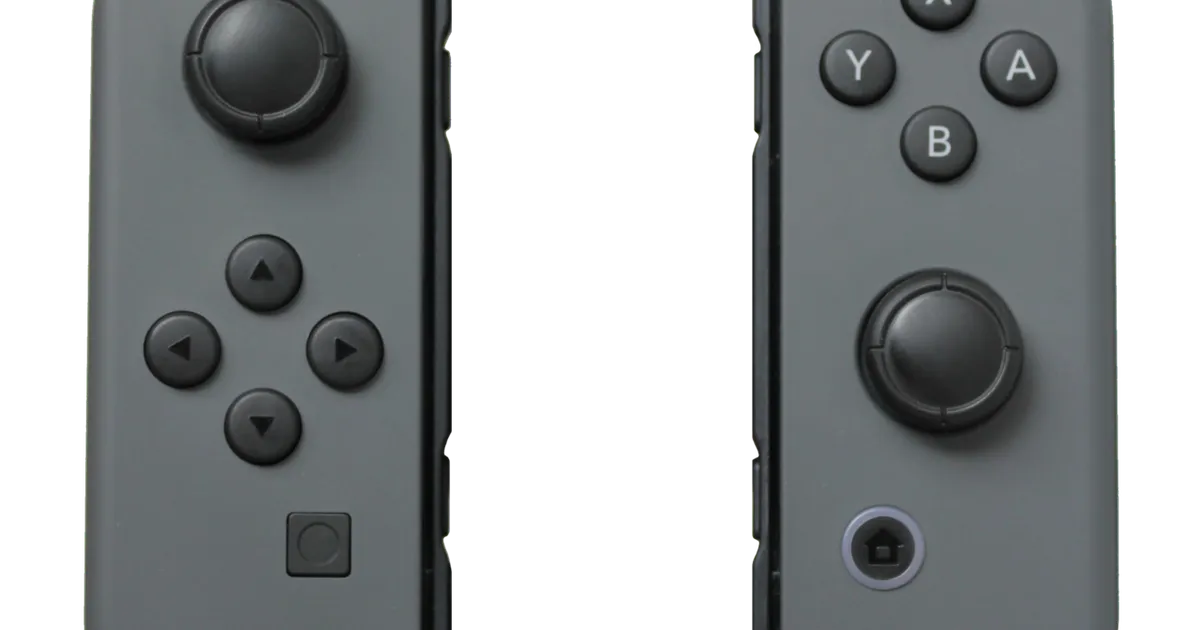
Photo by Owen1962 / Wikimedia Commons / Public domain
Joy-Con drift is probably the most widely known issue in the Switch ecosystem, but it’s far from the only thing that can go wrong. Knowing what causes these problems — and what you can realistically fix yourself — saves both money and frustration.
What Causes Joy-Con Drift
Drift happens when a control stick registers movement even though nothing is touching it, usually showing up as a character or camera slowly moving on its own. The most common cause is wear or dust contamination inside the analog stick’s internal sensor, which reads stick position using small electrical contacts that can wear down or get dirty with regular use over time. It isn’t caused by anything you’re doing wrong — it’s a known mechanical wear issue with the analog stick design used across multiple Joy-Con generations.
Fixes to Try Before Replacing Anything
Before assuming a Joy-Con needs replacing, try these steps in order:
- Recalibrate the stick through the console’s controller settings — this won’t fix physical wear, but it resets the stick’s reported neutral position and can resolve minor drift.
- Clean around the base of the stick with compressed air, holding the can upright and using short bursts to avoid moisture. Dust and debris under the stick housing is a common, fixable cause.
- Update your console’s system software, since occasional software updates have addressed calibration-related bugs in the past.
- Try a different game or check if drift is consistent across all software — if it only appears in one title, the issue may not be the controller at all.
If drift persists after cleaning and recalibration, it’s very likely a hardware wear issue that cleaning alone won’t fully resolve.
Preventing Drift and Extending Controller Life
You can’t fully prevent mechanical wear, but a few habits slow it down: avoid excessive force on the sticks, keep Joy-Cons away from dusty or sandy environments when possible, and clean around the stick base periodically rather than only after problems appear. Storing Joy-Cons in a case when not attached to the console also reduces dust exposure and physical wear from being tossed in a bag.
Other Common Switch Issues
Drift gets the most attention, but a few other issues come up often enough to be worth knowing about:
- Dock connector wear: repeatedly inserting and removing the console from the dock can loosen the connection over time, sometimes causing intermittent docked output issues. Handle the console gently when docking and undocking.
- Joy-Con desync or connection drops: usually resolved by reseating the Joy-Con, restarting the console, or checking for wireless interference from other nearby devices.
- Battery degradation on older units: like any rechargeable device, battery capacity fades with age and charge cycles — expect shorter playtime on a console that’s been in heavy use for a long time.
- Screen scratches in handheld mode: a low-cost screen protector applied early prevents most of the cosmetic and functional damage that shows up on unprotected screens over time.
Bottom Line
Most Joy-Con and Switch issues have a straightforward cause and a reasonable first step you can try at home before assuming you need a repair or replacement. Recalibration and cleaning solve a meaningful share of drift complaints, and simple prevention habits — gentle docking, a screen protector, keeping dust out — head off several other common problems before they start.
Our picks: Nintendo
Shop on Amazon
Affiliate links.As an Amazon Associate I earn from qualifying purchases. Links below go to Amazon; prices and availability change, so check Amazon for current pricing.Affiliate disclosure
SanDisk microSD Express card for Nintendo Switch 2
Switch 2 needs microSD Express cards for extra storage.
Check price on Amazon
Illustrative photos: Photo by Evan-Amos / Wikimedia Commons / Public domain; Photo by Owen1962 / Wikimedia Commons / Public domain