Open-Box and Refurbished Monitor Deals: Dead Pixels, Warranty and Returns
How to check an open-box or refurbished monitor for dead pixels and damage, and the warranty and return terms to look for.
Main page for monitors: Gaming Monitors →
How to check an open-box or refurbished monitor for dead pixels and damage, and the warranty and return terms to look for.
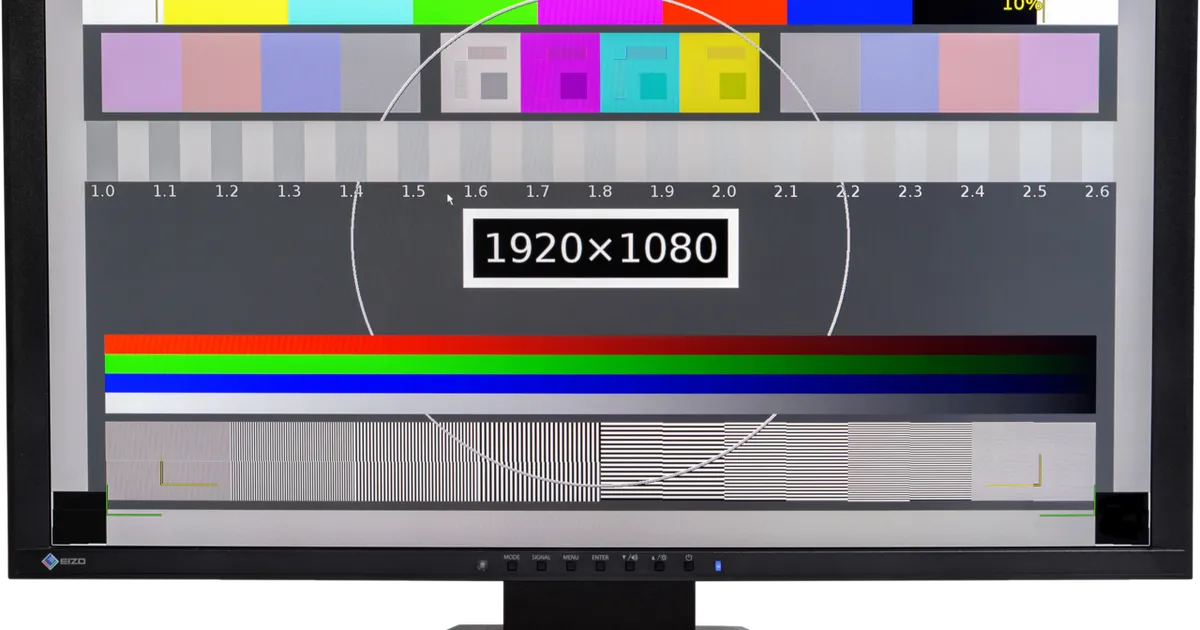
Photo by Lucasbosch / Wikimedia Commons / CC BY-SA 4.0
Affiliate links.As an Amazon Associate I earn from qualifying purchases. Links below go to Amazon; prices and availability change, so check Amazon for current pricing.Affiliate disclosure
Open-box and refurbished monitors can be cheaper than even Black Friday prices on new ones. Most are fine, but monitors can arrive with dead pixels, scratches or missing cables, and the warranty is often shorter. This guide explains what to check, comparing by design and listed terms, not lab testing. We don’t list prices; links go to Amazon’s current listings.
Quick answer
| Type | What it usually means | Main risk |
|---|---|---|
| Open-box | Returned or display unit, often like new | Missing accessories, light use |
| Manufacturer refurbished | Inspected and repaired by the brand | Shorter warranty than new |
| Seller refurbished / Amazon Renewed | Inspected by a third party | Quality varies by seller |
| Used | Sold as-is | No warranty, unknown history |
Compare against the new price first
Open-box and refurbished discounts only make sense against the current new price. During Black Friday, new monitors are often cut so far that refurbished units save little. Check both, and compare with the recent price history. See is that gaming monitor sale worth it?
Check the listing
- Exact model code: monitors with similar names can have different panels.
- Condition grade: “like new”, “very good” or “good”, and what each means for that seller.
- What’s included: stand, power supply, DisplayPort cable.
- Warranty: who provides it and for how long.
- Return window: long enough to test it properly.
- Seller rating: for Amazon Renewed and third-party sellers.
Test it as soon as it arrives
Dead and stuck pixels
Display full-screen solid colors (black, white, red, green and blue) and look closely for pixels that stay black (dead) or stay one color (stuck). Many monitor brands allow a small number of defective pixels under their policy, so a single dead pixel may not count as a warranty fault. That makes the return window your best protection.
Backlight and uniformity
On a black screen in a dark room, look for bright patches near the edges (backlight bleed) on IPS and VA monitors. Some glow is normal for IPS; large bright patches are not. OLED monitors don’t have backlight bleed, but check for uneven tint or burn-in on refurbished units. More in our guide to OLED monitor deals.
Refresh rate and ports
- Confirm the refresh rate in Windows display settings, with the DisplayPort cable.
- Test every port you plan to use, including HDMI for consoles.
- Check for flicker or signal drops.
Physical condition
Check the screen surface for scratches, the stand for cracks and the ports for damage.
Warranty differences
- Manufacturer refurbished often includes a manufacturer warranty, sometimes shorter than new.
- Seller refurbished depends on the seller.
- Open-box may still carry the full manufacturer warranty. Check whether it starts from your purchase date.
Good candidates for refurbished
Popular, well-reviewed models where many units are sold, such as the Dell S2721DGF or the Gigabyte M27Q, are easy to compare against new prices. See our budget 1440p monitor guide.
FAQ
Are refurbished monitors reliable? Usually, especially manufacturer refurbished. Test right away and keep the box until the return window ends.
How many dead pixels are acceptable? It depends on the brand’s pixel policy. Check it before buying; some brands offer zero-dead-pixel guarantees on certain models.
Bottom line
Open-box and refurbished monitors are good value when the saving is real, the warranty is clear, and you test promptly within the return window. See more picks in our Black Friday monitor guide.
Our picks: Gaming monitors
Shop on Amazon
Affiliate links.As an Amazon Associate I earn from qualifying purchases. Links below go to Amazon; prices and availability change, so check Amazon for current pricing.Affiliate disclosure
ASUS TUF Gaming VG27AQ
Popular 1440p high-refresh monitor that rarely disappoints.
Check price on Amazon


Illustrative photos: Photo by Lennybird / Wikimedia Commons / CC BY-SA 3.0; Photo by PantheraLeo1359531 / Wikimedia Commons / CC BY 4.0; Photo by Terabass / Wikimedia Commons / CC BY-SA 3.0